

The more internal and external services AI agents connect to, the more you need to manage which agent did what, and with whose permissions. On November 19, LangChain announced Tool Gateway for the LangSmith Agent Platform as a Public Beta. It lets you register MCP servers and handle, in one place, the tools shown to agents, the credentials of users and agents, and the control and recording of each call. This article draws on the announcement and the official documentation to explain how Tool Gateway works and the conditions to check when considering adoption.
LangSmith Tool Gateway at a glance
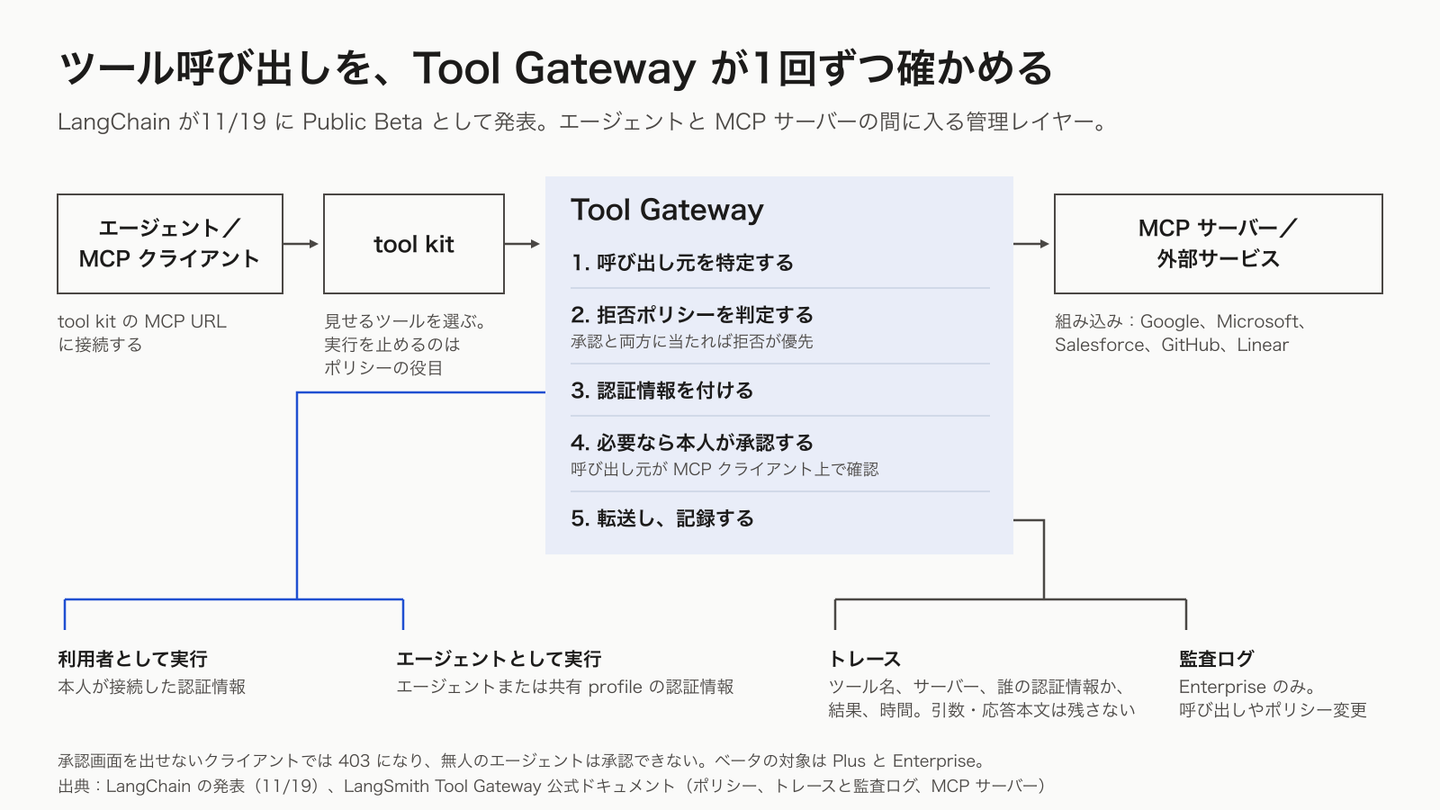
Tool Gateway is a management layer that sits between agents and MCP servers on the LangSmith Agent Platform (LangChain's announcement, official documentation). It does not replace MCP. It is positioned as a layer that manages calls to MCP servers. An MCP client connects to the URL of a tool kit, and the tool kit serves approved tools from multiple servers through a single MCP URL (official documentation).
The built-in servers include Google and Microsoft services, Salesforce, GitHub, and Linear. The official documentation also has a more detailed list of services, such as Google Calendar, Docs, and Drive, and OneDrive, Outlook, SharePoint, and Teams. For built-in servers that require authentication, users or others need to connect their accounts. To add an arbitrary remote MCP server, it must use Streamable HTTP over HTTPS (LangChain's announcement, adding MCP servers and the built-in list).
How a call flows
For each tool call, the Gateway identifies the caller, checks the policies, attaches the stored credentials, and forwards the call to the MCP server (LangChain's announcement, official documentation).
You can choose which identity a call runs under: run as the user, or run as the agent. The former uses the credentials the user connected themselves. The latter uses the credentials of the agent itself or of a shared profile set up by an administrator (LangChain's announcement).
Deny and approval policies that control agents' tool use
Administrators can set deny policies and approval policies on specific tools. When both apply, deny takes precedence (policy specification).
Approval works by having the caller themselves confirm each operation in a supporting MCP client. It is not a mechanism for routing an approval request to a separate administrator. In clients that cannot show the approval screen, the call fails with a 403 error, and agents running with no person present cannot approve (policy specification).
The point to watch is the difference between the roles of tool kits and policies. A tool kit selects which tools are shown to an agent. Whether a tool may be executed is controlled by policies. The official documentation also distinguishes the two (policy specification).
Records of agent operations and the audit log
Gateway traces can keep metadata such as the tool name, the server, whose credentials were used, the outcome, and the duration. The arguments passed to a tool and the body of the response are not recorded in Gateway traces. Traces can be kept in two ways: nested inside the agent's trace, or recorded across the whole workspace. An administrator enables the latter (traces and audit log specification).
The organization audit log, which records events such as tool calls and policy changes, is available on the Enterprise plan (LangChain's announcement, traces and audit log specification).
Beta scope and limitations
Although it is a Public Beta, it is not available on every plan or in every region. According to the official documentation, it covers LangSmith Plus and Enterprise. On Cloud, it is available on GCP in the US, EU, and APAC and on AWS in the US, and it is not available on Azure in the US. BYOC and self-hosted deployments require LangSmith v0.18 or later (official documentation).
Separately, according to LangChain's announcement, the company raised 3 billion (LangChain's Series C announcement). This is funding for the company as a whole, not the amount invested in Tool Gateway.
What Japanese companies should check when deciding whether to adopt it
Here are the points to check when considering adoption. First, whether your LangSmith plan and the region you use are within the scope of the beta. Next, whether the approval mechanism fits your operations. Because the caller themselves approves in the MCP client, it cannot be used for the operations of agents that run with no person present. Last, your audit requirements. The organization audit log is available on the Enterprise plan, and Gateway traces do not keep the arguments passed to tools or the bodies of responses. If your internal rules require recording the content of operations, you will need to consider other methods as well.
The more tools you connect to agents, the more it matters how you set, as internal rules, four things: which tools to show, which identity to run under, which operations require the caller's approval, and what to record.
Elith offers GENFLUX Security, which makes visible who is using which AI and detects and blocks access to unapproved AI and the sending of confidential and personal information.
For managing the use of AI, see Elith's GENFLUX Security.
Primary sources
- LangChain: Tool Gateway announcement (November 19): https://www.langchain.com/blog/langsmith-tool-gateway
- Tool Gateway official documentation: https://docs.langchain.com/langsmith/tool-gateway
- Policy specification: https://docs.langchain.com/langsmith/tool-gateway-policies
- Traces and audit log specification: https://docs.langchain.com/langsmith/tool-gateway-traces
- Adding MCP servers and the built-in list: https://docs.langchain.com/langsmith/tool-gateway-servers
- LangChain: Series C announcement (November 13): https://www.langchain.com/blog/series-c
By the Elith Editorial Team